> ## Documentation Index
> Fetch the complete documentation index at: https://docs.runalloy.com/llms.txt
> Use this file to discover all available pages before exploring further.
# Data Streaming
> Learn how to stream data from third-party applications to your server or data warehouse using Alloy Automation's Embedded iPaaS.
This feature only applies to Embedded iPaaS
## Overview
In Embedded iPaaS, streaming refers to sending event data from a third-party application to an external destination—either your own server or a storage system such as a data warehouse. This enables bidirectional integrations where your application can both perform outgoing actions **and** receive incoming data in real time or on a schedule.
For example, if you’re building a HubSpot integration, you might want your app to be notified whenever a new contact (lead) is created in a user’s HubSpot account.
Embedded iPaaS supports two types of triggers:
* **Realtime events (webhooks):** Alloy registers and listens to the webhooks you specify, then proxies incoming payloads to your designated destination.
* **Polling triggers:** For systems that don’t provide webhooks (for example, NetSuite or Magento), Alloy runs periodic polling jobs on its infrastructure to detect changes or new records.
While polling isn’t instantaneous, it ensures reliable data delivery for apps that lack webhook support.
***
## Streaming Data to Your Application
To stream data directly to your server, use the **Data Stream** connector from the Utilities section. This connector forwards event payloads to any HTTPS endpoint you provide.
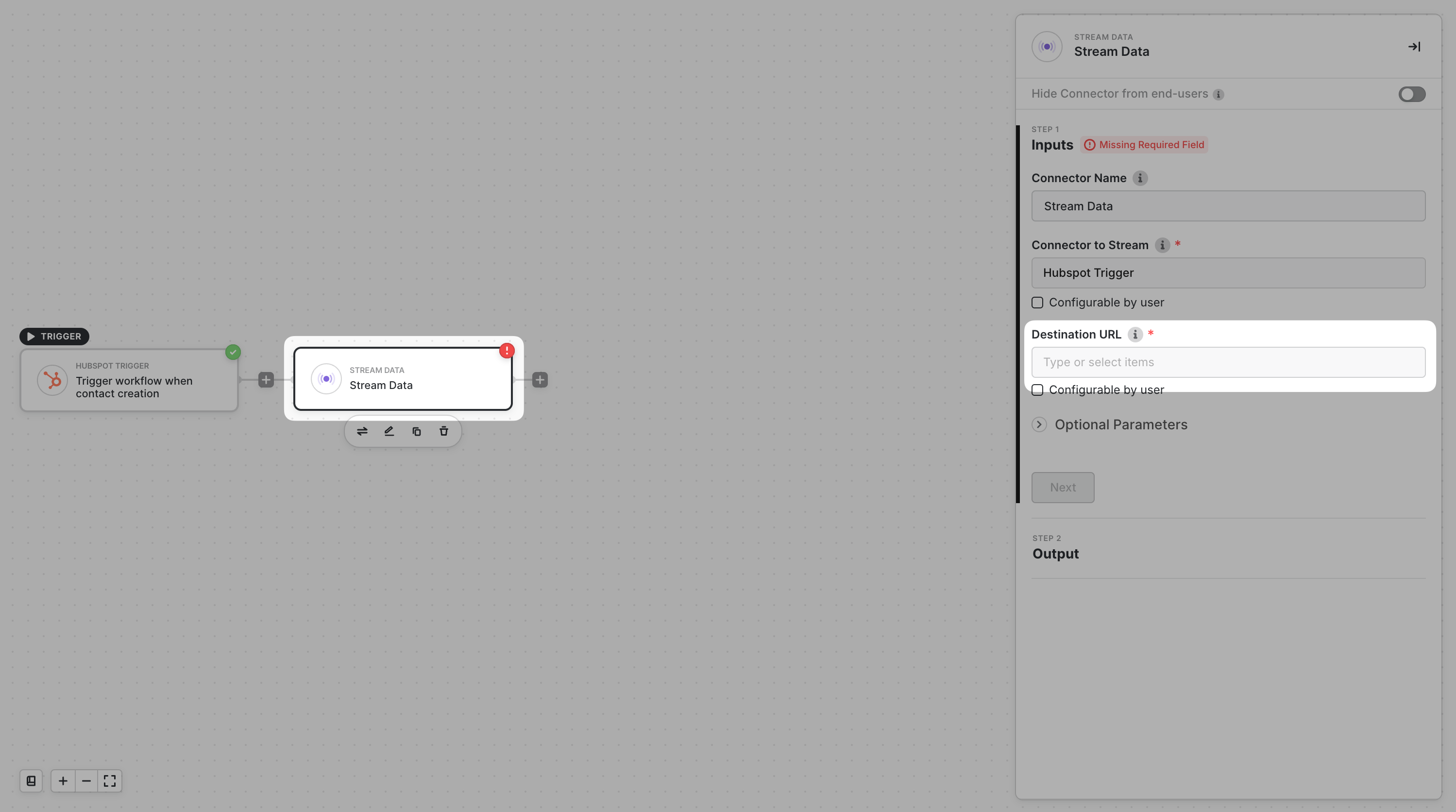
**Configuration steps:**
1. Add the **Data Stream** connector to your workflow.
2. Set the **Block to Stream** to your trigger (for example, *HubSpot Trigger*).
3. Enter your server’s webhook URL as the **Destination URL**.\
This endpoint must accept `POST` requests to receive event bodies. Tools like [ngrok](https://ngrok.com) are useful for local testing.
Alloy includes an `X-Alloy-Signature` header in every streamed request. Use this signature to verify that payloads originate from Alloy Embedded.
Once the workflow is active, every time the trigger event occurs (for example, a new HubSpot contact), Alloy will forward the payload to your specified webhook.
***
### Example Payload
Below is an example of a webhook payload streamed to your server (sample data from Shopify):
```json theme={null}
{
"customers": {
"id": 7845692539040,
"email": "17994c7b-f66f-45af-9bb4-4989085f47ad@gmail.com",
"orders_count": 0,
"tags": "Test",
"state": "invited",
"total_spent": "0.00",
"currency": "USD",
"verified_email": true
}
}
```